Tesla ships each Model 3 and Model Y with two key cards and a bifold wallet, and treats the card as the car's primary key rather than a backup — it is what works when a phone is dead, out of signal, or in someone else's pocket because you are handing the car to a valet. Tesla's own instructions are specific about where it gets used: tap the card against the pillar to the right of the driver's window to lock or unlock, and tap it behind the cup holders with your foot on the brake to start.
What Tesla does not supply is anywhere to keep it. There is no slot, no clip and no pocket cut for a card anywhere in either cabin. So the card ends up in a wallet, where it gets bent and abraded; in the armrest bin, where it disappears under everything else; on the console deck, where it slides into the footwell on the first roundabout; or nowhere at all, which is the most common outcome and the reason people search for this at the exact moment they discover the card is missing.
That timing matters for what you should buy. Protection is a nice-to-have. Findability is the problem.
How we chose
Four criteria, set before the shortlist and ordered deliberately. The ranking puts tracking above protection and protection above looks, because the failure this category exists to prevent is a lost card and a trip to a service center, not a scuffed one.
- Can you find it? A holder that makes a card trackable or clippable is doing something no sleeve can. This is the only criterion that addresses what actually goes wrong.
- Does the card still read? A cover over an RFID card is a real question, not a theoretical one. We only list products where the seller addresses it, and we quote what they say rather than vouching for it.
- Bulk. Tesla chose a card because a card slides into a wallet. Every millimeter a holder adds is working against the format, and a holder thick enough for an AirTag has to come off to tap the console.
- Material and wear. Edge fraying and a chewed corner are what a card looks like after four years loose in a pocket. A sleeve fixes that; which sleeve is mostly a question of what the material does over time in a hot cabin.
Quick picks
| # | Product | Best for | Score | Price |
|---|---|---|---|---|
| 1 | 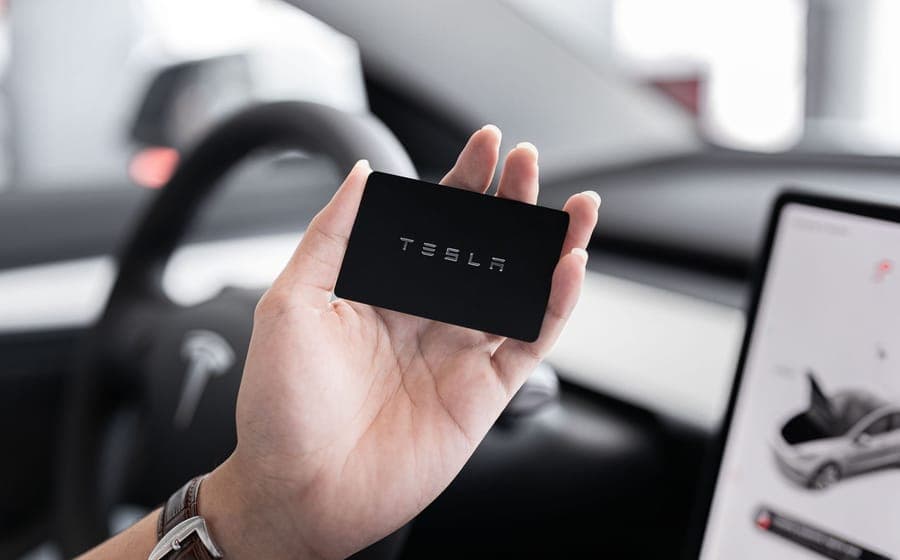 Spigen AirFit key card holder, two-pack Buy it for the AirTag slot. Everything else about it is a card sleeve. | Best overall, because it solves the real problem | 8.4 | |
| 2 |  Yeslak Alcantara key card holder The one to buy if your card lives in a wallet and you want it to stop looking chewed. | Best slim sleeve | 7.9 | |
| 3 | Yeslak key card holder with keyring strap The right place to spend almost nothing: put the spare card in it and clip it somewhere you will remember. | Best for the spare card | 7.4 |
Scores are our editorial assessment of fitment scope, published materials and coverage. They are not lab measurements and we have not tested these products.
1. Best overall, because it solves the real problem
Spigen AirFit key card holder, two-pack
Nobody damages a key card. People lose them. This is the only holder we could verify that has a built-in AirTag slot, which turns a card you cannot find into a card you can, and it ships as a two-pack with carabiners — matching the two cards Tesla supplies with the car. It is also the only card holder on this page that publishes its dimensions. The honest trade is bulk: taking an AirTag means roughly half an inch of thickness on a card designed to be almost nothing, so it has to come out of the holder to tap the console and start the car. The AirTag is not included.
Best for: Owners who have already lost track of a key card once
Fits: Model Y (2020-2024) · Model Y Juniper (2025-2026) · Model Y L (2026+, six-seat) · Model 3 (2017-2023) · Model 3 Highland (2024-2026)
What works
- The AirTag slot is the only feature in this category that addresses the actual problem, which is not a scratched card but a card nobody can find
- Two holders in the box, which matches the two key cards Tesla ships with the car — most rivals sell one
- Published dimensions and weight, which no other card holder here provides
- Carabiners mean the card can live on a bag or a keyring instead of loose in a pocket
What does not
- The most expensive key card option here, and that is before the AirTag, which is not included
- Making a holder thick enough to take an AirTag makes a deliberately thin card thick — this one is roughly half an inch deep
- A thick holder has to come off the card to tap the console and start the car, which is real daily friction. Tesla's own instruction is to tap the card behind the cup holders
- Nothing is published about the material beyond scratch-resistant
Manufacturer specifications
- Brand SKU ACP08793; scratch-resistant shell with carbon-fiber detailing
- Built-in AirTag slot, which the brand describes as a loss and theft prevention feature with lossless signal
- In the box: two card holders, two carabiners and four protective films
- Published size 5.70 x 2.57 x 0.49 inches; 1.3 oz
- Brand states compatibility with all Tesla models
- Two-year manufacturing warranty stated by the brand
Specifications as published by the manufacturer. We have not independently tested this product.
Specification sources: Spigen Tesla AirFit key card holder, two-pack with AirTag slot (TO244)
2. Best slim sleeve
Yeslak Alcantara key card holder
A slide-in Alcantara sleeve that keeps the card thin enough to still behave like a card, which is the whole reason Tesla chose the format. Alcantara is also the one material here that looks like it belongs in a Tesla interior rather than sitting on top of it, and edge wear — the actual thing that destroys a card carried loose for five years — is exactly what a sleeve prevents. Six colorways means the car card and the wallet card are distinguishable at a glance. No tracking, no keyring, and a napped fabric in a car cabin eventually picks up grease and sunscreen.
Best for: Owners who want the card protected without making it thick
Fits: Model Y (2020-2024) · Model Y Juniper (2025-2026) · Model Y L (2026+, six-seat) · Model 3 (2017-2023) · Model 3 Highland (2024-2026)
What works
- Thin enough that the card still behaves like a card, which is the whole point of the format
- Alcantara is the one material here that matches a Tesla interior rather than sitting on top of it
- Edge wear is the real failure mode of a card carried loose for five years, and a sleeve is the correct fix
- Six colors makes two cards distinguishable at a glance, which matters when one lives in a wallet and one in the car
What does not
- No tracking, no keyring, no AirTag slot — it protects the card and nothing else
- Alcantara is a napped fabric in a car cabin, which means it picks up grease from hands and sunscreen over time
- Nothing is published about thickness, so OEM-fit slim is the brand's word
- Mid-priced for a sleeve, which is a lot next to the plain plastic alternative
Manufacturer specifications
- Genuine Alcantara, suede-like finish
- Slide-in sleeve; the brand describes the fit as snug but still easy to remove
- Brand states it is an OEM-fit slim design with no added bulk
- Listed for the Model 3, Model Y, Model S, Model X and Cybertruck
- Six color and stitching combinations
- Brand states it prevents scratches and edge wear
Specifications as published by the manufacturer. We have not independently tested this product.
Specification sources: Yeslak Alcantara key card holder, slide-in sleeve
3. Best for the spare card
Yeslak key card holder with keyring strap
The cheapest thing on this page by a wide margin, and the correct home for the second card almost everyone leaves in a drawer. A keyring strap with a metal snap is the practical half of the product: a card you can clip to a bag or a keyring is a card that has an address. Yeslak also answers the one question that matters for any card cover, stating that it does not affect signal recognition. Nothing is published about the material, there is no tracking, and the strap and snap add bulk to something designed to slide into a wallet.
Best for: Second cards, valets, and anyone who wants the cheapest workable answer
Fits: Model Y (2020-2024) · Model Y Juniper (2025-2026) · Model Y L (2026+, six-seat) · Model 3 (2017-2023) · Model 3 Highland (2024-2026)
What works
- The cheapest thing on this page by a wide margin, which makes it the obvious home for the spare card
- The strap is the practical half of the product — a card you can clip to something is a card you can find
- The brand addresses the one question that matters for any card cover, which is whether the card still reads
- Five colors, so the spare does not get confused with the daily card
What does not
- No material published at all, which for a part whose job is to survive years in a pocket is the main thing you wanted to know
- No tracking and no console mount — this is a sleeve on a strap
- A strap and a snap add bulk to something designed to slide into a wallet
- Published specifications on this listing are thin next to its Alcantara sibling
Manufacturer specifications
- Sleeve with a keyring strap and a metal snap closure, so it can hang from a keyring or a bag
- Brand states it does not affect signal recognition
- Listed for the Model S, Model 3, Model X, Model Y and Cybertruck
- Five colors: black, pink, blue, red, gray
- One holder per package
- No material published
Specifications as published by the manufacturer. We have not independently tested this product.
Specification sources: Yeslak key card holder with keyring strap for Model S, 3, X, Y and Cybertruck
The console mounts are all unbuyable right now
This is the honest headline of the category in late 2026, and it is why this page is three products rather than five. The most useful thing you can do with a key card is leave it in the car, secured, where it functions as a spare key that cannot be locked out and cannot be forgotten at home. Several companies have built small acrylic or plastic brackets that stick to the console deck behind the cup holders — precisely where Tesla tells you to tap to start — and hold the card against cornering forces. Every one of them that we checked was out of stock.
| Product | Listed for | Published detail | State when checked |
|---|---|---|---|
| EVANNEX CardRails | Model 3 and Model Y | Laser-cut gloss black acrylic, 3.9 x 3.3 x 1/8 in, adhesive tape, made in the USA | Sold out, waitlist only |
| Teslaunch center console key card holder | Model 3 2017-2023 and Model Y 2020-2024; states it does not fit the 2024 Highland | Clamp-style fixing, 9.9 x 8 x 0.3 cm, no adhesive claimed | Unavailable, back-in-stock signup |
| Tesery acrylic console card holder | Model 3 2017-2023.10 and Model Y 2017-2024 | Acrylic, anti-slip, gloss black | No price or stock state published at all |
If leaving a card in the car is your actual goal and you do not want to wait for stock, the practical interim is a sleeve on a strap clipped to something fixed in the cabin, or the card tucked into a console insert that has a card slot cut into it. Two of the trays on this site's other pages have exactly that: Spigen's sliding console organizer carries card slots alongside its bottle well, and BASENOR's armrest insert is sold for glasses, keys and cards together. Both appear on cup holder expanders and sunglasses holders respectively.
Will a holder stop the card working?
This is the question every listing in this category gets asked and most of them answer with a single sentence. The key card is an RFID card and it has to be read through whatever is on top of it, at a short range, in two specific places: the B-pillar and the console deck behind the cup holders. Thin fabric and thin plastic are not a problem in principle. A thick holder, a metal element, or a second card stacked directly against it are where range problems come from.
Yeslak states its strap holder does not affect signal recognition. Spigen describes its AirFit holder as having lossless signal with the AirTag installed. We have not measured either claim and are not in a position to. What we will say plainly is the practical consequence: with a slim sleeve, people tap the card still in the sleeve; with a thick AirTag-carrying holder, expect to slide the card out to start the car, and judge whether that friction is worth the tracking. For most people who have lost a card once, it is.
Two cards, two jobs
Tesla supplies two cards per car and almost nobody uses the second one. That is a waste, because the two cards want different treatment and buying for both is cheaper than it sounds.
The daily card is the one that lives in a wallet and gets used at a valet stand or when a phone dies. It wants to be thin above all, which argues for a slim sleeve: Alcantara if you want it to look like it came with the car, plain plastic if you do not care. The spare card is the one that should either be at home in a drawer as the recovery key, or clipped somewhere in the car behind a PIN. It wants a strap and a color that is obviously not the daily card, which is exactly what the cheapest product on this page provides.
The AirFit two-pack is the one product that covers both cards at once, which is part of why it ranks first — two holders and two carabiners in a single purchase, with the AirTag slot available in whichever of the two you are more likely to lose.
What a few years of wear actually looks like
A Tesla key card is thinner than a credit card and has no raised features, which means the wear it takes is all at the edges and corners. A card carried loose in a trouser pocket with coins and keys delaminates at a corner first, then starts to fray along an edge, and the failure is eventually functional rather than cosmetic — a card with a lifted corner catches on things and does not sit flat against a reader. Tesla sells replacements, which is the other reason a few dollars of sleeve is good economics.
Heat is the other factor and it is specific to a car with a large glass roof. A card left on a console deck in direct sun in summer is sitting on a black surface under glass. None of the sellers here publishes a temperature rating, so we will not pretend to know the threshold, but it is one more argument for the card living in a shaded, lined place rather than in the open — and for the glass roof shade that this site covers under sunshades.
Where this fits in the rest of the console
A key card is the smallest object in the car and it is subject to the same problem as everything else in a Tesla console: there are no divisions, so small things migrate to the bottom of the armrest bin. The structural fix is a tray or insert with slots, not a holder for each object — full console tray versus insert bins is the decision, and under-screen storage trays covers the shelf where a card is most likely to be put down and forgotten.
If you are setting up a new car from scratch rather than solving one annoyance, the first-accessories pages are the better starting point: Model Y Juniper first accessories and Model 3 Highland first accessories both put a card holder in context against the parts that matter more.
Our call
Buy the Spigen AirFit two-pack if you have ever lost a key card, or if you can imagine losing one. It is the only option here that addresses the failure that actually happens, it covers both of the cards Tesla gave you, and the half-inch of thickness it adds is a fair price for knowing where the card is. Budget for an AirTag on top, because it is not included.
If your card lives in a wallet and never leaves it, the Alcantara sleeve is the better buy — thin, kind to the card's edges, and the only one of these that looks like part of the car. Put the spare card in the cheap strap holder and clip it somewhere deliberate. And if what you really wanted was a bracket that holds the card on the console deck, the honest answer today is that the good ones are out of stock; watch the EVANNEX part, and in the meantime use a console insert with a card slot.
Questions people actually ask
How many key cards does a Tesla come with?
Two, plus a bifold wallet, according to Tesla's own key card listing for the Model 3 and Model Y. Most owners only ever use one, which is why the second card is the obvious candidate for a cheap strap holder or a drawer at home.
Where do you tap a Tesla key card?
Tesla's instructions are to tap the card on the center of the pillar to the right of the driver's window to lock or unlock, and to tap it behind the cup holders with your foot on the brake pedal to start the car. That second spot is why console-mounted card brackets sit where they do.
Will a key card holder stop the card from being read?
The sellers here say no — Yeslak states its holder does not affect signal recognition and Spigen describes its AirTag holder as having lossless signal. We have not measured either claim. In practice a slim sleeve can be tapped with the card still inside, while a thick AirTag-carrying holder is easier to use if you slide the card out first.
Is there a key card holder that mounts in the car?
Several exist and all of the ones we checked on 2026-10-26 were unbuyable: the EVANNEX CardRails was sold out, the Teslaunch console holder was unavailable, and the Tesery acrylic holder publishes no stock state. A console insert with a built-in card slot is the available workaround.
Should I leave a key card in the car?
It makes a useful spare that cannot be left at home, and it makes the car easier to steal if someone gets into the cabin. If you do it, enable PIN to Drive first — it is a free setting and it is the part of this decision people skip.
Can I use an AirTag to track a Tesla key card?
Yes, with a holder built for it. The Spigen AirFit holder has a dedicated AirTag slot; the AirTag itself is sold separately. The cost is thickness — the holder is roughly half an inch deep, which is substantial on a card designed to be nearly flat.
Sources
- Spigen Tesla AirFit key card holder two-pack (TO244) — AirTag slot, package contents, published dimensions
- Yeslak Alcantara key card holder — slide-in sleeve, six colorways
- Yeslak key card holder with keyring strap for Model S, 3, X, Y and Cybertruck
- EVANNEX CardRails console key card holder — published dimensions, and sold out when checked on 2026-10-26
- Teslaunch center console key card holder — listed fitment and exclusions, unavailable when checked on 2026-10-26
- Tesla Shop Model 3 / Model Y key cards — two cards and a bifold wallet per car, and Tesla's own instruction to tap the pillar to unlock and tap behind the cup holders to start
Specifications and fitment claims on this page come from the manufacturer and retailer pages listed above. We have not tested these products and do not claim to have.
Read next
Console Organizers
Best Tesla Sunglasses Holders for the Model Y and Model 3
Armrest holders, a magnetic case beside the wheel and console trays with a glasses bin — which fits which generation, and which one actually protects the lenses.
Console Organizers
Tesla Cup Holder Expanders for Oversized Bottles
The opposite of an insert: replacement console trays, a door-mounted holder and a universal adjustable ring, for owners whose 32 or 40 oz bottle will not fit the factory well.
Console Organizers
Best Tesla Under-Screen Storage Trays
The dead shelf beneath the touchscreen, used properly: the trays that fit both cars, what each holds, and the one to buy first.
Console Organizers
Full Tray vs Insert Bins: Which Console Setup
One molded tray against a set of separate bins: capacity, rattle, cleaning and cost.
Guides
Model Y Juniper: What to Buy First
A buying order for a new Juniper: the first week, the ones to wait on, and the ones to skip.
Guides
Model 3 Highland: What to Buy First
A buying order for a new Highland, with the console fitment bonus this car uniquely has.